GNOME
Template
Manager
Effortlessly manage your document templates on GNOME. A lightweight CLI designed for high-performance system orchestration and instant right-click "New Document" access.
Quick Deployment
Inject the engine into your environment with a single line.
The GNOME "New Document"
Dilemma
By default, many GNOME desktop environments don't allow you to create a new blank document by right-clicking. This script allows you to create a new blank document in your desired file format.
We can create the file types we want using the GNOME Template Manager.
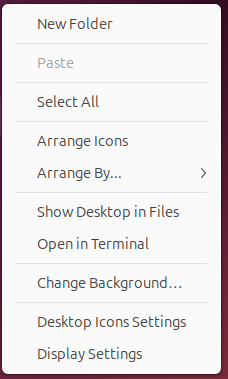
Standard GNOME installation with no templates configured.
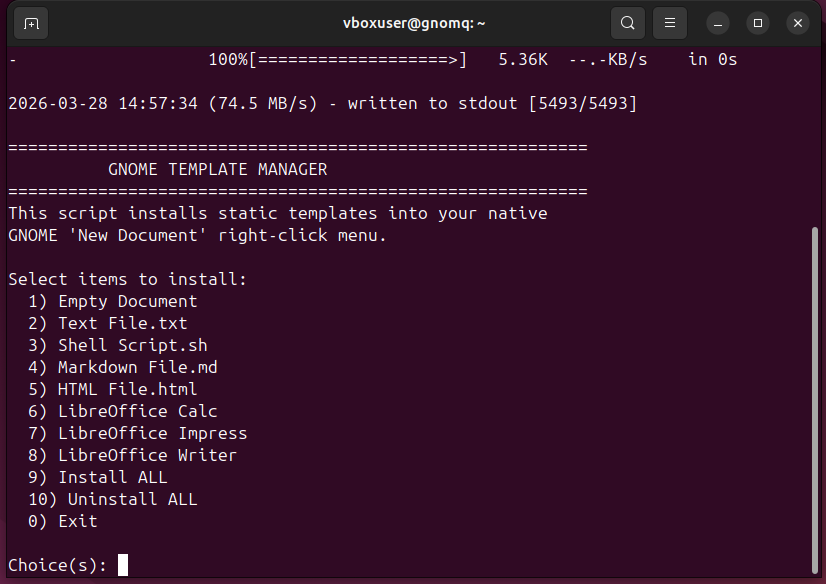
Instant right-click access enabled for all document formats.
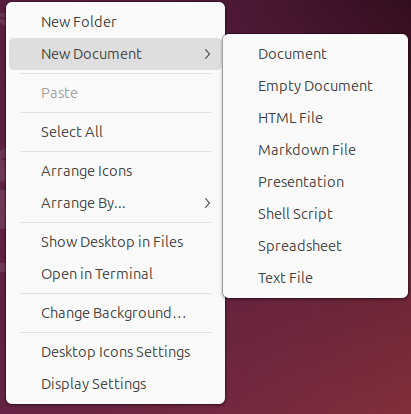
Instant right-click access enabled for all document formats.
Architectural Highlights
Engineered for simplicity and native system feeling.
GNOME Integration
Seamlessly hooks into the Nautilus file manager. Adds your custom templates directly to the 'New Document' right-click menu without manual configuration overhead.
Smart Localization
Automatically detects your system language using gettext, ensuring files are natively named (e.g. English, Turkish) and mapped to correct directories.
Universal Support
Dynamic detection for LibreOffice. Scans for installation and provides Text, Markdown, and comprehensive format support only if needed.
Zero-Touch Cleanup
Need to revert? A clean exit strategy is built-in. Run the script and select Option 10 for absolute removal and immediate restoration of original GNOME settings.